Posts

How to add start button to Windows 8
Image
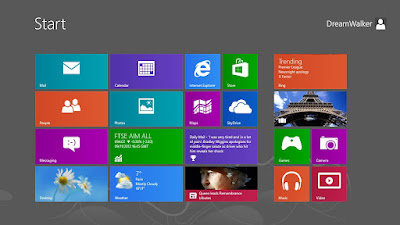
Bored with Windows 8 Metro style start menu ? want to add Windows xp , 7 like Start menu in Win 8 install classic shell to get your START button Back on Windows 8 OS open up this url in your browser  http://www.classicshell.net/ download and install latest files then  after installing go to start button, right click ..  select "settings" on the pop-up form, select "all settings" done !  different styles  Windows classic style Windows XP style  Windows 7 Style  This website also provide Windows 7 Classic explorer styles  System Requirements Classic Shell works on Windows Vista , Windows 7 , Windows 8 , Windows Server 2008, Windows Server 2008 R2 , and Windows Server 2012 , Both 32 and 64 Bit Versions are supported (the same installer works for both) enjoy :)

How to download Expert One e-certificates , card from HP Partner Portal new method

Image
goto this link  https://www.myexpertone.com/hpcpbenefits/hplogin.aspx login to HP Expertone partner portal using your partner id  then click on Certification tab and Click on "e-Certificates & id card " Scroll down  Download enjoy 

How to create your own live fm broadcast

Image
for this you need few things Computer Internet caster.fm account  Dj  softwares first register an account in caster.fm   < = click here to during registration you have to create two passwords login password  broadcasting password you have to remember both passwords because every time you have to use both passwords to broadcast ! no you have to download Dj client  i recommend mixxx because its available  for all os , i am using Mac here  Note # before installing mac you have to download a package file and install it in your Mac its called lame  click here to get package  lame package url   download it double click and install it  to download Mixxx you have to go to this link   mixxx downloading url install it       its easier in all os in Mac download dmg file mount it then drag it to application folder done Note # ...

HP Slate 7 (HP's first android tablet)

Image
HP announced the HP Slate 7 , an affordable Android Jelly Bean consumer tablet that provides customers with easy access to Google Mobile services. With a 7-inch diagonal screen and weighing 13 ounces, the HP Slate 7  is an ideal trusted personal companion, featuring a stainless-steel frame and soft black paint in gray or red on the back. It also is the industry's first tablet to offer embedded Beats Audio, for the best-sounding, richest audio experience available on a tablet. Powered by an ARM Dual Core Cortex-A9 1.6 GHz processor, the HP Slate 7  is fast and responsive. Integrated wireless allows customers to access email, the internet and key applications, while the High-aperture-ratio Field Fringe Switching (HFFS) panel offers wide viewing angles that provide easy viewing of documents, games, photos and videos—even in outdoor lighting conditions. The HP Slate 7  includes a 3-megapixel camera on the back and a VGA camera on the front for chattin...

MYO - Wearable Gesture Control from Thalmic Labs

Image
  MYO - WEARABLE GESTURE CONTROL FROM THALMIC LABS  THE NEXT GENERATION             OF GESTURE CONTROL       Supports    Windows and Mac OS will be fully supported, and APIs will additionally be available for iOS and Android developers to integrate the myo on those platforms.                         UNLEASH YOUR INNER   JEDI.                                                       With  the wave of your hand, MYO will transform how you interact with your digital world. Then MYO armband lets you use the electrical activity in your muscles to wirelessly control your computer,phoneand other favorite digital technologies.  Specifications  The MY...

How to install Steam in linux

Image
Want to play games in Linux ?  install Steam  enjoy Steam :) Steam team have announced launching of Linux version of Steam  here i am going to show you how to install team in your Ubuntu / Linux Mint  its simple  download this .deb file to your desktop and install it    click to start download Steam.deb

How to download Expert One e-certificates , card from HP Partner Portal

Image
for new Method scroll down  Certified as an HP Professional ! want to download e-certificates ? And you don't know what to do that ?  just follow the steps in the post  first you need to go to  HP partner portal (google will give your link )   for asia pacific gateway   click this link  select your country  type your user id and password   click train and certify  click benefits portal  select e-Certificates & ID cards  There you go ...... now you can download your both certificates and id card