Posts

Apple Opens OS X Beta Seed Program to Every one if you are not even Developer

Image
Apple Starts opened up its OS X Mavericks beta testing program to everyone not just developers ... you can download the latest OS X beta seeds. To join the program all you have to do is visit the OS X beta Seed Program page  , accept the confidentiality agreement, and you will get a Beta Access Utility for you Mac(download and install it) that will give you access to all pre-release versions of OS X via Mac App Store Update panel. Installing beta Access Utility  by this way you can access beta release ,  "Always remember to backup you current working apps before update" enjoy..............

How to add Backtrack repository to ubuntu based linux

Image
How to add Backtrack linux repository to ubuntu based linux Well i have only tested this on ubuntu and mint , try this on your own risk ! Open your terminal  type following commands step1 wget -q http://all.reposttory.backtrack-linux.org/backtrack.gpg -O- | sudo apt-key add -  step 2 sudo sh -c "echo 'deb http://all.reposotory.backtrack-linux.org revolution main microverse non-free testing' >> /etc/apt/sources.list" step 3 sudo apt-get update   after completing update successfully you can install bactrack software from terminal , synaptic  package manager, ubuntu software center , Mint software manager etc ! :D

How to extract/mount Nero images ( .nrg ) in Linux

Image
How to extract/mount Nero images ( .nrg ) in Linux to install nrg2iso in linux  use this command  open terminal  type following command press enter type password  “password will be hidden” # sudo apt-get install nrg2iso  To convert .nrg file to .iso  use this command  nrg2iso source.nrg destination.iso #note !!!!!  nrg2iso = software command source.nrg = source file path of .nrg file to be converted  Destination.iso = destination file path of .iso to get as result  Enjoy !

Private Browsing !

Image
Privacy mode or Private Browsing Privacy mode  or " private browsing ", sometimes informally referred to as " porn mode ",  is a term that refers to privacy features in some  web browsers . Historically speaking, web browsers store information such as browsing history, images, videos and text within  cache . In contrast, privacy mode can be enabled so that the browser does not store this information for selected browsing sessions. This allows a person to browse the Web without storing local data that could be retrieved at a later date. Privacy mode will also disable the storage of data in  cookies  and  Flash cookies . It is of note that this offers virtually no privacy protection beyond the local level. For example, it is still possible to identify frequented websites by associating the  IP address  with the user on the server end. History The earliest reference to the term was in May 2005 and used to discuss the privacy features i...

How to add new Smileys Stickers to your facebook comment !

Image
open up www.facebook.com  then  open any one of your friends  after open up chat window click on emotion icon (emoticon) a smiley window will popup then select sticker store from there to add more stickers  Now  Sticker store will appear  scroll down to view all kind of stickers available  you can preview then by clicking icon called preview  or  add then to your sticker gallery by clicking Free now added stickers will appear in emoticon window ! enjoy :)

Creating HP Recovery Discs (Windows 7)

Image
Open up Recovery Media Creation application from start Select Create Recovery Media using blank DVD(s) ,click next This window shows how many Discs you needed , insert blank dvd and click next DVD must be DVD-R ,  You need approximately 4 blank DVD+R discs.(May vary) The Recovery Media Creation software program states how many discs are needed at the beginning of the process.Click next after completing all 3 process click next insert next disc after completing all Discs  click next Congratulations You have Successfully created the recovery media NOTE: If Recovery Media Creation or Recovery Disc Creation is not available (grayed out), then a recovery image has already been created. Due to license restrictions, only one set of recovery media can be created. Any new recovery media must be ordered online or obtained using another method. Video Tutorial

How to create USB Bootable Pendrive to update Bios

Image
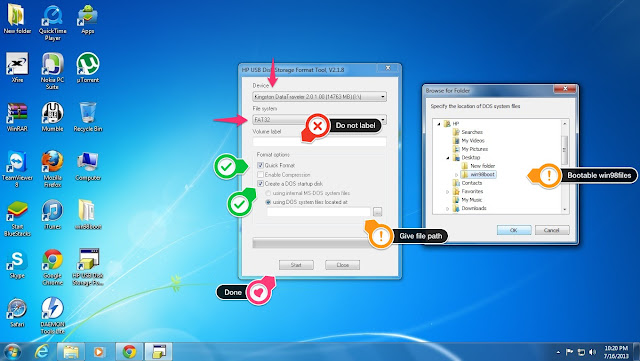
Hi friends here i am going to show you how to make a USB Bootable Pendrive to UPDATE BIOS *  i am using HP Bios files for this tutorial Things you need !  a Pendrive  Windows 98 Boot Files  => Here is the link :  Click to download HP USB Disk Format Tool  =>  Here is the link :  Click to download Bios Files  a PC with Windows OS  Here we go ......... Connect your pendrive to your pc  Download your files (above mentioned ) Extract all file to Desktop  Install HP USB Disk Format Tool V2.1.8 ( Right Click and RUN as admin to install or run program ) after installing run program as RUN as Administrator  confirm you have selected right pendrive in application  select format as FAT32 Do NOT label  tick Quick format  tick Create a DOS system files located at:   now show path where you have extracted win98boot files "show folder" now click ok  then start now...